
Plan every bead before you buy one.
A digital canvas for experienced bead crafters — lay out the colors, counts, and stitch structure up front, so the only surprise left is how good it looks.
Because “I’m out of black. Again.” shouldn’t be a surprise halfway through a project.
Made for iPad, and it comes along on iPhone. Works fully offline — your designs never leave your device. The browser version does almost everything, printable PDF export included; sharing a finished image needs the app, and a reference photo lasts only the session.
The part that isn’t the fun part — handled
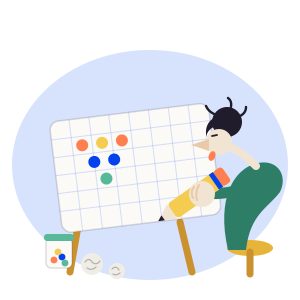
Plan the colors, counts, and structure with a real bead catalog, so you can get to the beading sooner.
Real bead catalogs
Over 4,500 genuine colors across seven catalogs — Miyuki Delica (11/0, 15/0, 10/0, 8/0), Miyuki Round 11/0, TOHO Round 15/0 and Aiko 11/0. Search by catalog code, color name, or finish. Add your own bead type if you work in something else.
Finish, not just color
Two beads can share a color and be completely different products. Transparent, galvanized, AB and lustre beads are marked right on the grid, so you can tell them apart at a glance — and filter the color search down to the finish you want.
Realistic Preview
See a lit render of the finished beadwork before you commit a single bead. Matte, glossy, metallic, transparent, and AB finishes each catch the light the way the real beads do.
Color Match
Pick a base color and a harmony — complementary, analogous, triadic and more — and get a palette that actually works together. Save the ones you like, and start the next pattern straight from a saved palette.
Pattern Generator
Start fast with auto-generated stripes, gradients, checkerboards, and speckle fills, then make it yours bead by bead.
A pattern PDF you can sell
Export a real pattern sheet: cover, bead legend with counts and symbols, and a chart tiled across printable pages with a row of overlap to tape them together. Stamp each copy with the buyer’s name — the part that still identifies the file after someone photographs it — and set a password to open it.
Collections, favorites & Library
Group patterns into folders, heart the ones you keep coming back to, and filter the board down to a stitch or your favorites. Or start from the bundled library of ready-made designs.
A backup you keep
Your whole library saves to a single file — keep it, move it to a new phone, restore from it. Restoring only ever adds: it cannot overwrite or delete the patterns already on the device.
Private by design
No account, no backend, no tracking. Everything stays on your device, and product analytics are anonymous and fully opt-in. Available in English and Czech.
A canvas that keeps up with your hands
Tap to place a bead, drag to move around the board. The tools underneath are the ones you actually reach for on a long piece.
Fill a row, a column, or a whole area
One tap lays a background in around your motif — the flood stops dead at the beads that enclose it, and the whole fill is a single undo.
Move or copy a block
Mark a rectangle, then slide it, nudge it a bead at a time, or stamp a copy further along the band. Nothing is written until you confirm it.
Find the middle
A center guide marks the bead — or the seam, when the count is even — that you count out from. That is how a motif gets placed on a band.
Cross off finished rows
Tap a row number as you complete it. Put the work down for a week and you still know exactly where you stopped.
Focus mode
Everything but the grid and your colors gets out of the way — with undo, redo and save still within reach.
The screen stays awake
No lock screen halfway through a row, with a needle in one hand and a bead in the other.

Dedicated to every bead the carpet has ever eaten.
Plan on screen instead — your beads stay safely in their tubes until the design is settled.
Start from a photo, or a pattern you already have
Three ways into a design that isn’t an empty grid. The app does the tedious part — turning something you already have into real, orderable beads.
Photo → pattern
Pick an image, say how many colors you want and how wide the piece is, and Bead Board reduces it and matches every color to the nearest bead in a real catalog. Works best on simple illustrations, logos and pixel art.
Trace over a reference
Put a photo underneath the grid, drag and pinch it into place, and bead over the top. Fade it down when you want to see the pattern on its own, or hide it entirely.
Bring a pattern across
Open a pattern made in another bead app and it comes over with its grid intact, its codes matched to a catalog we carry. Anything we can’t identify is listed for you, never quietly guessed.
Drawn the way your stitch really sits
Bead Board draws the grid the way each technique actually grows — offset rows where they belong, straight rows where they don’t. And when one piece changes stitch partway, it draws that too.


Loom Weaving
Clean rectangular rows. Ideal for geometric, symmetrical patterns.

Brick Stitch
Rows offset by half a bead. A tight, masonry weave.

Peyote Stitch
Interlocking columns. Diagonal rhythm, soft edges.

Mixed Stitches
One piece, several stitches — bands of loom, brick and peyote stacked up the same pattern.
At home on iPad, at hand on iPhone
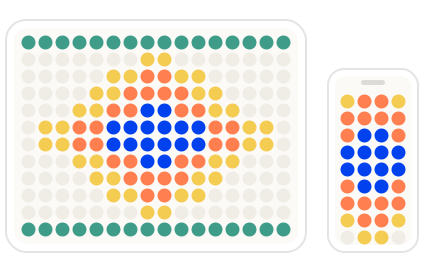
Beadwork wants room. A forty-column pattern deserves a screen you can take in at a glance, so Bead Board is built for the iPad first: the whole board in front of you, the palette beside it, and every bead big enough to hit on the first tap. On iPhone it is the same app through a smaller window — pinch, scroll, and paint the part you are working on.
iPad
The full pattern at a glance, with room left for the color palette beside it — and beads large enough that placing one is a single, certain tap.
iPhone
The same designs, the same catalogs. Zoom and scroll through the grid, and take the finished pattern with you to the bead shop.
One universal app, one download — it installs on both. Designs are saved on the device you draw them on: there is no account and no cloud sync — a backup file is how a library moves to a new phone.
Plan boldly. Buy once.
Bead Board is heading to the App Store soon. Plan the whole thing first — then buy exactly what you need, and bead what you actually pictured.
You’re among your own.